7 Deadly Design Sins of the Bit.ly UX refresh

Bit.ly recently thrust a new design upon the world to the loud and thunderous applause of just about no-one. Rather than run in horror, I thought it would be instructive to point out a few of the more apparent flaws in their design. As they say, in life you’re either an example to follow or a warning to be avoided. I think the new Bit.ly redesign falls into the latter camp.

UX Sins 1&2: Hide the most important commands

Admittedly I’m not a power user of bit.ly, but I would think that for any shortlinks service creating the shortlink and accessing the shortlink would be among the most used tasks. So I find bit.ly’s choice of where to place these commands at best curious. Adding a shortlink is located all the way to the top right. Eye tracking study after eye tracking study has shown that – for users in left to right languages – the top right is mostly ignored. A few commands can get away with it because of general design precedent across the industry – search and login being two such examples. In general though, the top right should be avoided.

Even more troubling, access to the shortlink is hidden behind a curious i icon. At first I thought erroneously, “This control must be here somewhere and really easy to find.” So I looked in vain before eventually reading the help. Yikes. It’s another click away.

UX Sin 3: Promote the least important control

Again I’ll admit to not being a power user – but ‘Your network’ is right in the hot zone of controls I look at first, and is completely useless to me. Why would I ever go there? Why is it so prominent?

The navigation between Bitmarks, Bundles and Stats seems reasonable, but they’ve made an odd choice promoting ‘Profile’ to the same level. I only use that once in a blue moon, right? There’s a reason the entire rest of the Internet world puts profile controls in the top right.

UX Sin 4: Help is needed to use the app

If you find yourself wishing that users had more training, or that help were easier to find then you have failed to create a usable design. Devoting a large portion of your first page to help should be like a flashing siren that something is wrong.

Unfortunately, in this case help is actually necessary because of UX sins 1 and 2.

UX Sin 5: Tooltips everywhere, all at once

As you hover over elements on the page tooltips flash on and off, helpfully informing you of anything from the obvious ‘you can select multiple bookmarks’ to the esoteric ‘click here for the short link’. I’m not against tooltips in general, but their use should be judicious. They should clarify only the most confusing concepts. The best designs will make those concepts self evident.

UX Sin 6: The whole page is full of ads

From the huge help banner at the top, to the ads down the right hand side. The actual content of the experience is squashed into the middle, barely appearing before the scroll bar on my 24″ inch monitor. As a guide, if most of the elements of your page has close buttons, you’re doing it wrong. The one exception is a customizable dashboard, but the UI below doesn’t qualify as a dashboard.

UX Sin 7: Unreadable text

Typography is something you never notice unless it is beautiful, like Microsoft’s Metro, or awful like our example today. The weight, kerning and spacing of the text is sloppy, and makes it difficult to read.

This is actually quite difficult to get wrong in HTML because generally your standard Verdana or Arial work just fine.

It’s easier to criticize

Bit.ly’s new design does a lot wrong – if I had the time and a few more thousand words I could dissect each nuance of the design, but I think by now you get the point. Yet it is easier for me to sit in judgement than create the design. I look at the finished product and see everything that is wrong with it. I didn’t create it. I didn’t balance the conflicting design, business and engineering goals to produce what you see below.

The hard thing about a design is not only making it beautiful and functional, but bringing it to market. The most perfect design is useless if it never sees the light of day.

I hope that the bit.ly team can learn from some of their mistakes, and improve in the next release. I do love their service, just not the redesign.
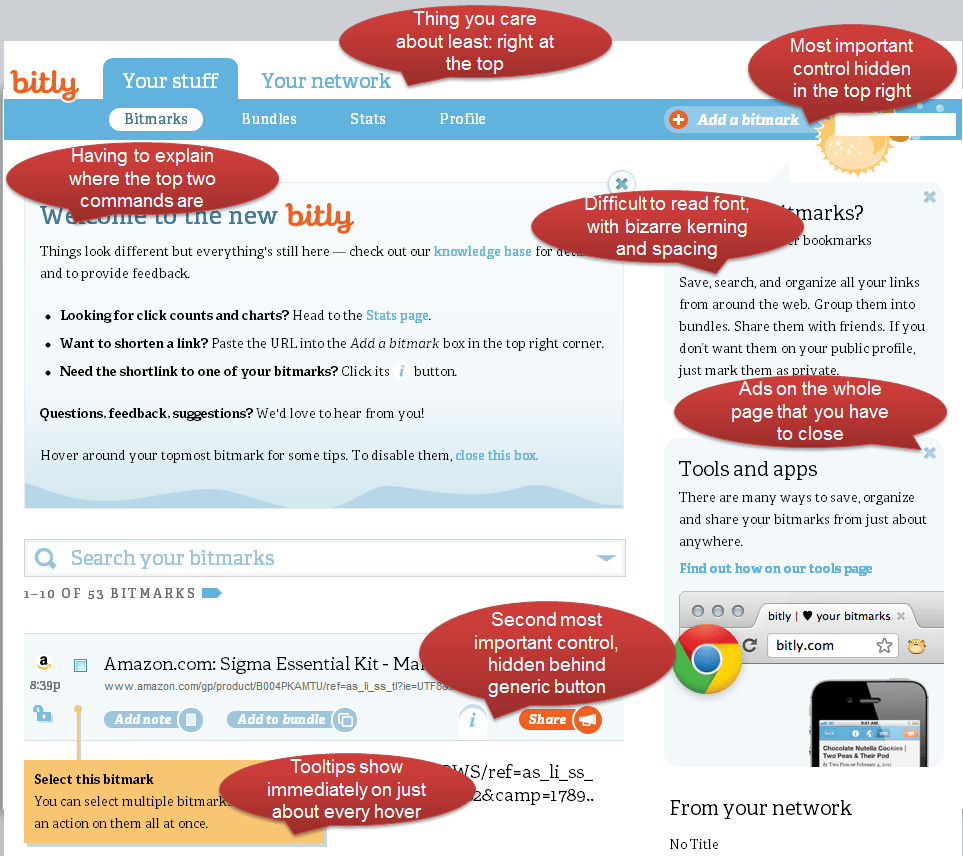
7 UX Sins of the Bit.ly redesign

7 UX Sins of the Bit.ly redesign

2 Comments

  • 1
    Richard Hoefer
    June 5, 2012 - 3:00 pm | Permalink

    Vanessa, you’ve done a great job deconstructing bit.ly’s redesign. Here is my own experience:

    It was nice to see that on the un-logged-in homepage, the entry box to paste a link into was visually obvious and simple — though I wish it were higher up the page. They’re of course trying to push new visitors to register or use facebook or twitter credentials. After the short link was presented, I was curious to see if an unregistered user would be able to customize the link name, but I suspected no, as another inducement to register. But they don’t even reveal at that spot this additional advantage to having an account with bit.ly .

    I then logged in, arrived at the page you critiqued. I couldn’t agree with you more. I had a url I’d copied, ready to paste and get a short link and I was draw to the large search-box with the magnifying glass icon, but quickly discovered that was not the place to paste. I didn’t read the blue help box above because it was too dense with information, with too small type to engage my eye. But I looked over the page and saw the box upper right, but I had to read the prompt “Paste a link here” or I would not have known that was the purpose of the box… but a second later would conclude there’s no other box so it must be here.

    For me, that friendly bubbly fish was and is a huge distraction, vs. a magnet that draws me to create a short link there by Mr. or Ms Fish. This shows how much I ever paid attention to bit.ly’s brand attributes on their old site: Did they have this fish mascot and underwater world theme there? (ahoy, username)

    After pasting in the link, I got a pop-up, and the rest of the screen dimmed white behind it. I just counted: there are 6 actions I can take before getting a short link — the primary objective of the site! 2 of them are more prominent, but suffer in clarity from your observation that the typography is too-tightly kerned, making the words somewhat hard to read. The hot-color pushes “save and share”, the cool blue color suggests “save”. But where is the action called “SHORTEN”? Are they assuming every user has already used their service? For me, I’ve never much used the extra features of bit.ly where I’d come back to view my page, with the exception of seeing how many people have clicked that link, which is very helpful. But I would suggest that “Save” and + are not intuitive an action for someone who’s come here to shorten links.

    Further, the message box called “Add a note?” … My mind asks “for whom?” . I have no idea where that note attaches. If it’s a note to myself what this page of content is, ok fine, but maybe the prompt reads closer to that, ie. “Note about this webpage?” (It doesn’ matter that it’s longer since it disappears upon typing).

    Now I click SAVE, and what a terrible resulting presentation. In this mono-chromatic blue, it is hard to instantly recognize where your webpage and its short-link appears on that homepage. But fine, I see my entry, and the first thing, again, that I want to do is customize the name. Where? I clicked on the short-link, I clicked on copy, the little pencil icon wasn’t prominent enough to catch my attention. And i couldn’t believe I had to look around for a HELP button or link — Not part of the global navigation. Yet, as you note, “profile” is. So I look in the blue “welcome” box, see the link “knowledge base”, and click it. I tried putting “rename links” in search box. An answer is not readily found. So I browse topics and come to “How do I customize a link?” And that’s where I found I had to click on the pencil to edit the link.. but if I wanted to edit another of my saved links, I would first have to click “i” for information, THEN click the pencil to edit. And for me the primary purpose for my using that service is short-links I can rename.

    I want to just add that it is annoying when sites treat their support or knowledge base sites as distinctly separate from their main site — as does bit.ly . When I clicked the bit.ly logo top-left within the knowledge base, I did not go back to the homepage of bit.ly . The “home” button is buried bottom-right … I didn’t notice it, because I never would have thought to look there, though I did look for a footer. So I actually retyped bit.ly in address window.

    There is one thing that I am not as bothered by as you are. It’s what you are calling “ads” on the homepage. And you are rightly articulating that site usage and functionality should be apparent from a well-designed site. But I would argue that when a brand transitions to a substantial design refresh, there are going to be some things probably moved around a little. It happened with Pandora, Stumble Upon, it happens a lot. I will grant you that bit.ly executes their help boxes very poorly — again, type is kerned too tight, and I think they are too text intensive. But I think it’s perfectly fine, in principle, to present some initial help boxes that are easily dismissed forever by clicking the X mark. Mozilla does this with Firefox new releases — but they are the Platinum Standard in UX and UI design, in my opinion. But Gmail uses initial help boxes as well. But I think your point was — why are they occupying 3/4 of the page?

    Agreed.

    I am glad I saw your critique linked to from someone on G+ .

    but the one they push is .getting a short link, now i wanted to get to my objective: renaming the link. I like custom-naming short-links, and so I looked for that capability.

    • 2
      June 5, 2012 - 8:02 pm | Permalink

      Thanks Richard,
      You make lots of good points – I really think they missed the mark on this one.

  • Leave a Reply